
Wind Meter5.0 - App Store
You'll be able to see results in few seconds.
Publisher Description
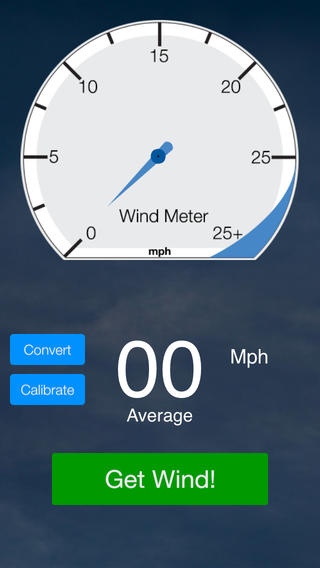
The Original Wind Meter
*******
Wind Meter 5.0 - Supports iPhone 4 and 5, iOS 6, iOS 7, iOS8.
Note: You must grant access to your microphone under Settings > Privacy for the application to work properly.
****** A TOP "20" PAID WEATHER APPLICATION FOR 24 MONTHS STRAIGHT******
THE ORIGINAL WIND METER APP DESIGNED TO MEASURE WIND SPEED DIRECTLY ON YOUR PHONE
No CELL TOWER or signal is necessary! Wind Meter works by measuring the volume of wind flowing over your iPhone microphone and converting it into an effective wind speed reading in REAL TIME at your location!
As quoted by: KITELIFE MAGAZINE -
"In our own field tests here at KITELIFE, we found that in a relatively consistent wind speed of 3-28 mph, the Wind Meter app was surprisingly accurate."
As quoted by: BLUE WATER SAILING MAGAZINE -
"We were really jazzed to see this new wind speed app for the iPhone and downloaded it right away. It is really cool and will be appreciated by sailors everywhere."
As quoted by: PANBO MARINE ELECTRONICS -
"Would you believe it? -- it actually works. I was out testing and photographing the NMEA 2000 wind rig early this morning and thus could compare Wind Meter to a consensus of five high quality sensors mounted just a few feet over my head".
Ben Ellison - PANBO MARINE ELECTRONICS
As quoted by: ROBERT JOHNSON MEN'S MID-d & DISTANCE COACH, CORNELL UNIVERSITY CO-FOUNDER, LETSRUN.COM -
"As a Division 1 Track Coach and operator of LetsRun.com, I was stunned to learn that the iphone could measure wind speed. This app works as advertised and is a lot of fun to take to a track meet." Robert Johnson - CORNELL UNIVERSITY
OTHER REAL WORLD USERS:
Was at Seaside on the weekend and a guy had the app. We put it up next to a wind meter and was only off from the wind meter by 1 mph--pretty impressed.
Reference: http://forums.ikitesurf.com/viewtopic.php?t=12643
Works real good; pretty accurate side by side with other handheld meters. seems to have better averaging [as compared with skywatch]
Reference: http://forums.iwindsurf.com/viewtopic.php?p=102262
"First Test Proved it For Me, Very clever app! By chance it's blowing tonight, so I went up to our flat roof and stood a few feet below our Davis instruments anemometer. The Davis recorded a max gust of about 26 mph while the max I recorded with the Wind Meter was 23 mph. Had I climbed a ladder, I expect the readings would have been even closer."
OPERATOR'S MANUAL:
When you open the Wind Meter APP the screen will rotate so that the microphone end of the phone will now be on top. To obtain the best wind speed readings, simply hold the iphone upright and straight out to your side with the screen facing you, letting the wind slip over the top of the phone, and push Get Wind! Wait at least 5-10 seconds and then push Got Wind! The final reading is the average for the period. The Wind Meter estimates wind speeds from 4-28 mph. We recommend that you test the Wind Meter for your particular iPhone or type of use, using only natural wind and a commercial grade anemometer for comparisons. While the default calibration is appropriate for many phones, if your iOS device appears to over or under measure, you can easily calibrate your phone's Wind Meter Application by pushing the Calibrate button. Due to the necessary installation of a noise dampener, the Wind Meter is most effective in consistent winds. For the same reason, it begins to effectively estimate wind speeds that are above 5mph. Additionally, Wind Meter cannot measure wind speeds over 28mph (hurricane strength winds) since this equates to the max decibel level an iPhone can detect.
This application is not intended to replace commercial grade anemometers or scientific instrumentation.
Wind Meter supports multiple units of measure including Miles Per Hour, Knots, Kilometers Per Hour, Beaufort, Feet Per Second, and Meters Per Second.
http://www.goingapps.com
Requires iOS 5.1 or later. Compatible with iPhone, iPad, and iPod touch.
About Wind Meter
The company that develops Wind Meter is GoingApps LLC. The latest version released by its developer is 5.0.
To install Wind Meter on your iOS device, just click the green Continue To App button above to start the installation process. The app is listed on our website since 2009-03-02 and was downloaded 0 times. We have already checked if the download link is safe, however for your own protection we recommend that you scan the downloaded app with your antivirus. Your antivirus may detect the Wind Meter as malware if the download link is broken.
How to install Wind Meter on your iOS device:
- Click on the Continue To App button on our website. This will redirect you to the App Store.
- Once the Wind Meter is shown in the iTunes listing of your iOS device, you can start its download and installation. Tap on the GET button to the right of the app to start downloading it.
- If you are not logged-in the iOS appstore app, you'll be prompted for your your Apple ID and/or password.
- After Wind Meter is downloaded, you'll see an INSTALL button to the right. Tap on it to start the actual installation of the iOS app.
- Once installation is finished you can tap on the OPEN button to start it. Its icon will also be added to your device home screen.
Program Details
System requirements
Download information
Pricing
Version History
version 5.0
posted on 2009-03-02
Disclaimer
Official App Store Link
We do not host Wind Meter on our servers. We did not scan it for viruses, adware, spyware or other type of malware. This app is hosted by Apple and passed their terms and conditions to be listed there. We recommend caution when installing it.
The App Store link for Wind Meter is provided to you by apps112.com without any warranties, representations or guarantees of any kind, so access it at your own risk.
If you have questions regarding this particular app contact the publisher directly. For questions about the functionalities of apps112.com contact us.
